While msn was (and still is) not working I started using facebook chat. I had the idea why not use pidgin? After I goooooogled it I found this code.google.com/p/pidgin-facebookchat. No messing around api keys. Just install the deb or exe. It works on ubuntu fine.
Once you install it add a new account. Find facebook chat (has the facebook icon). Enter details and it should log you in. It even pulls photos of friends. Neat.
Showing posts with label facebook. Show all posts
Showing posts with label facebook. Show all posts

Chess
I haven't been instant messaging much lately since I started playing chess on facebook and chess.com. It makes a change from reading endless philosophy.
I really like chess.com although they haven't yet sorted out their live play, their turn based rocks. I stopped playing at yahoo because of an annoying bug asking to clean cache. When I clear everything manually from firefox and flash lo-and-behold still same old cold message. Well doesn't matter I was fed up of people leaving games or my internet failing on me and finding I was returning to a lost game (they get someone (jerk) to join and resign on my behalf). Frustrating.
A few chess posts might appear when I feel like it. I was thinking about showing good games I have played or writing about the grandmasters I like. I like studying Ricard Reti. His style appeals to me.
If anyone plays, play me.


I really like chess.com although they haven't yet sorted out their live play, their turn based rocks. I stopped playing at yahoo because of an annoying bug asking to clean cache. When I clear everything manually from firefox and flash lo-and-behold still same old cold message. Well doesn't matter I was fed up of people leaving games or my internet failing on me and finding I was returning to a lost game (they get someone (jerk) to join and resign on my behalf). Frustrating.
A few chess posts might appear when I feel like it. I was thinking about showing good games I have played or writing about the grandmasters I like. I like studying Ricard Reti. His style appeals to me.
If anyone plays, play me.
Update facebook status using twitter
You can use the twitter application on facebook to update your status.
In its settings you will find status update option. Enabling it allows anything you post on twitter to automatically be set as your status.
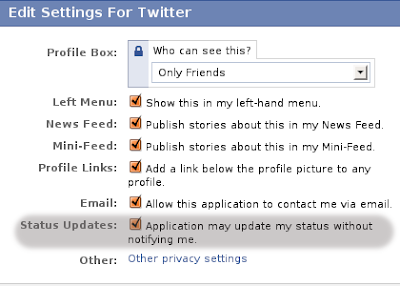
Once you have twitter and facebook connected you can start using your terminal to update your status. Using curl of course. (sudo apt-get install curl for ubuntu users)
curl -u username:password -d status="Your Post" http://twitter.com/statuses/update.xml
Change user name and password obviously.
In its settings you will find status update option. Enabling it allows anything you post on twitter to automatically be set as your status.

Once you have twitter and facebook connected you can start using your terminal to update your status. Using curl of course. (sudo apt-get install curl for ubuntu users)
curl -u username:password -d status="Your Post" http://twitter.com/statuses/update.xml
Change user name and password obviously.
Subscribe to:
Posts (Atom)

