Showing posts with label programming. Show all posts

Gvim on ubuntu

  • 1
One of the greatest text editors of all time with support for GNOME2 GUI.

Many features included. My favorite being the split screen view, syntax highlighting, colour schemes. Useful for a lot of things but I like to write C in this. The current vim version in ubuntu repositories is VIM - Vi IMproved 7.0 (2006 May 7, compiled May 22 2007 21:12:53). There is a 7.1 out.

Install with
sudo apt-get install vim-gnome

www.vim.org

Yabasic on the PS2

  • 3
Apart from stealing cars on GTA I like to dabble with yet another basic on the ps2 demo disc. I'm not a fan of BASIC but since its on the playstation its fun. It comes on the bundled demo disc. I don't think it comes with the newer slim ps2. It's probably the most interesting thing on the ps2 apart from the linux kit. It has no real use other than just fun. According to wiki "This was included in a failed attempt to circumvent a UK tax by defining the console as a "computer" if it contained certain software".

Sadly its impossible to save programs to media other than the memory card. I don't have a memory card reader for the PC. Makes it hard to write anything large and distribute it.

I don't really care to make games on the ps2, if I did would use some C and acquire the Linux kit or just a overpriced ps3. The biggest program I have written is about 30 lines and that was a little drawing program. Move drawn circle around the screen with the keyboard (I could use the control pad if I wanted to).

There is a version of the Yabasic interpreter for Linux and Windows at www.yabasic.de. You can download the ps2's interpreter source code from playstation2-linux.com/projects/yabasic. Example code and reference with the ps2 in mind can be found at members.chello.nl/~a.vanarum8/Yabasic. The ps2 version only came with PAL ps2's.

Playing with ruby/sdl

  • 0
Pretty tired right now. Been playing around with ruby/sdl most of the day. I looked at some of the examples in '/usr/share/doc/libsdl-ruby1.8/examples'. They have no comments but most are simple enough to run and play with to understand whats going on. There is also a tetris clone that is 275 lines of code. I found www.kmc.gr.jp/~ohai/rubysdl_doc.en.html, the ruby/sdl reference to be useful for looking up a few things.

I had a try at moving an image (in this case a image called icon.bmp, use the one in examples) around with the left, right, up and down keys. Could probably change the IF statements into case statements.

#Writen by DnH500. DnH500.blogspot.com
#you need a smallish icon.bmp image

require 'sdl'

#make the main window
SDL.init( SDL::INIT_VIDEO )
screen = SDL::setVideoMode(600,480,16,SDL::SWSURFACE)
SDL::WM::setCaption('moving around','')

#load image
image = SDL::Surface.loadBMP("icon.bmp")
image.setColorKey( SDL::SRCCOLORKEY || SDL::RLEACCEL ,0)
$image = image.displayFormat

#starting image postion
@x=0
@y=0

#move function
def move

if SDL::Key.press?(SDL::Key::RIGHT)
@x = @x + 10 #moves right
end

if SDL::Key.press?(SDL::Key::DOWN)
@y = @y + 10 #moves down
end

if SDL::Key.press?(SDL::Key::LEFT)
@x = @x - 10 #move left
end

if SDL::Key.press?(SDL::Key::UP)
@y = @y - 10 #move right
end

end

#main loop
while true
#on event
while event = SDL::Event2.poll
#scan keyboard input
SDL::Key.scan
#draw background
screen.fillRect(0,0,600,480,0)

#goto move function
move

#draw bmp image
screen.put(image,@x,@y)
#update
screen.updateRect(0,0,0,0)
end
end


I was surprised how easy sdl is. This stuff makes more sense to me than darkbasic (a windows game development basic). Plus with it being on linux it's an added bonus since I have never played with any graphics programing on linux before.
Now if I could work out a way to create a map with arrays I could start a 2d RPG.

Simple CLI Ruby Menu

  • 0
input = ""
#loop until q is pressed
while input != 'q' do
puts "- Menu A, b or c"
input = gets().chomp()

if input == 'q'
puts( "Bye" )
elsif input == 'a'
puts( "a" )
elsif input == 'b'
puts( "b" )
elsif input == 'c'
puts( "c" )
else
puts ( "You didn't press a b c " )
end
#end loop
end

Geany IDE

  • 0
I was looking for an IDE to play with some C++. As you do. And while looking for one thats in the ubuntu repositories I came across Geany.


Reminds me a little of devC++ on windows. Comes with templates for html, php, ruby, pascal, java, D, C and C++. Its lightweight and fast. Doesn't take long to load. Not much to setup for C++. I just installed G++ and I was off. Code completion in some languages. However there inst one (yet) for C++. You can run it on every OS that supports GTK+.

If you want to install it on ubuntu:
sudo apt-get install geany

If you want complie C++ install G++:
sudo apt-get install G++

You can find other builds from Geany.uvena.de

5 min VB6 program Save msn contacts

  • 0
Not posted any code for a long time on any blog so thought I would publish this vb6 program to save contacts to txt file.

What you need:
  • a brain
Other things you will need!
  • A working VB6 ( we dont need .net, otherwise I would have done this in C# )
  • Msn

Every control on the program is by defualt name. You dont need to rename any control! Start a new project and add
  • 1 Textbox
  • 1 command button
  • 1 label
  • microsoft common dialog control 6.0 (find it in project, components or CTRL - T) drag that in anywhere on the form
  • Setup a reference to Messenger API Type library (find it in project, reference)
The command button should have a caption like save. The textbox is where the contacts are going to be shown. It should have a scroll and be enough to see a whole contact with out scrolling side ways.

the form code:
'code writen by Darknighthunter500@gmail.com // http://dnh500.blogspot.com 2006
Private Sub Form_Load()
Set msn = New MessengerAPI.Messenger
' set msn as msnAPI
Dim msncontact As IMessengerContact 'contact stuff
Dim msncontacts As IMessengerContacts
Set msncontacts = msn.MyContacts

For Each msncontact In msncontacts 'start to add all the contacts to the list
'in a FOR NEXT loop
Text1.Text = Text1.Text + vbCrLf 'new line
Next


Label1.Caption = "Number of contacts" & " " & msncontacts.Count 'will show the number
'of contacts
End Sub


Now for saving the contacts using the CommonDialog1 control.
the command1 (the button) code:
Private Sub Command1_Click()
Dim filename As String

On Error GoTo SaveAsErr
'the txt file filter
If Me.CommonDialog1.filename =
"" Then
Me.CommonDialog1.DefaultExt = "txt"
Me.CommonDialog1.Filter = _
"Text Files (*.txt)|*.txt"
End If
' display the Save As dialog
CommonDialog1.ShowSave
' get the resulting filename
filename = CommonDialog1.filename
Open filename For Output As #1
Print #1, Label1.Caption + vbCrLf + Text1.Text 'save god dam it!
Close #1

SaveAsErr: 'abandon ship
Exit Sub
End Sub


Ok so I have not really commented much on the file saving part, but its really simple stuff.
You should having something like this
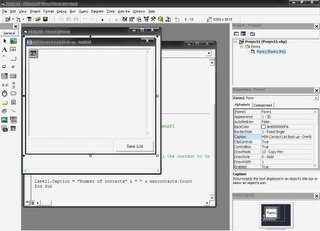

If your getting errors running it make sure you have selected Messenger API Type library in references or its just not going to work. If you dont like the CommonDialog method of saving then use more simple method like below to save the text file to C:\contacts.txt
Private Sub Command1_Click()
Dim hFile As Long
Dim sFilename As String
sFilename = "c:\contacts.txt"
hFile = FreeFile
Open sFilename For Output As #hFile
Print #1, Label1.Caption + vbCrLf + Text1.Text
Close #hFile
End Sub


You can write a lot of small programs in vb6 for msn. Have fun